Python - 101
Python
Python - Python - 101
Introduction
Python is a clear and powerful object-oriented programming language, comparable to Perl, Ruby, Scheme, or Java.
Python is a dynamic, interpreted (bytecode-compiled) language. There are no type declarations of variables, parameters, functions, or methods in source code. This makes the code short and flexible, and you lose the compile-time type checking of the source code. Python tracks the types of all values at runtime and flags code that does not make sense as it runs.
Some of Python’s notable features1:
- Uses an elegant syntax, making the programs you write easier to read.
- Is an easy-to-use language that makes it simple to get your program working. This makes Python ideal for prototype development and other ad-hoc programming tasks, without compromising maintainability.
- Comes with a large standard library that supports many common programming tasks such as connecting to web servers, searching text with regular expressions, reading and modifying files.
- Python’s interactive mode makes it easy to test short snippets of code. There’s also a bundled development environment called IDLE.
- Is easily extended by adding new modules implemented in a compiled language such as C or C++.
- Can also be embedded into an application to provide a programmable interface.
- Runs anywhere, including Mac OS X, Windows, Linux, and Unix, with unofficial builds also available for Android and iOS.
- Is free software in two senses. It doesn’t cost anything to download or use Python, or to include it in your application. Python can also be freely modified and re-distributed, because while the language is copyrighted it’s available under an open source license.
1 Taken from Official Beginners guide
Installation
Installing Python is generally easy, and nowadays many Linux and UNIX distributions include a recent Python. Even some Windows computers (notably those from HP) now come with Python already installed. If you do need to install Python and aren’t confident about the task you can find a few notes on the BeginnersGuide/Download wiki page, but installation is unremarkable on most platforms. 2
2 Taken from Official Python Get started guide
Try the playground
If you want to try Python in your browser, please try this playground. It will let you write and run your code without needing to install anything on your computer.
Overview
If you want to see Python in action, it is recommended to look a this link, where you will find sample code with comments that will show you the basics of Python so you can quickly get hands-on experience.
Flow Control
Once you get acquainted with the basics of the Python syntax, the next thing you will like to do will be to control the flow of your application based on certain conditions. In this guide you will find information about how Python handles the flow control of your application.
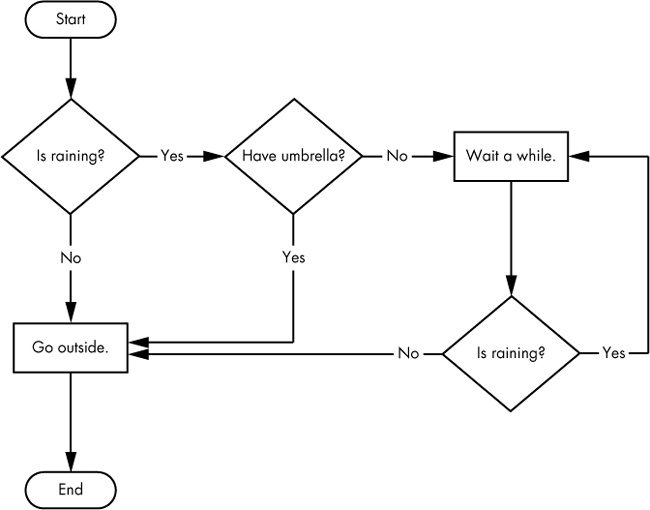
Control flow example diagram
If you want to try some control flow logic with Python, please use this workspace. You will find it useful!
Functions
A function is like a mini-program within a program. A function in Python is a block of code that only runs when it is called. You can use it as a black box, where you put parameters and get results. The simplest definition of a function in Python is shown below:
def my_function():
  print("Hello from a function")
More resources about functions
If you want to try some functions, please use this workspace:
Lists
The list is the most versatile datatype available in Python, which can be written as a list of comma-separated values (items) between square brackets. An important thing about a list is that items within need not be of the same type. A more graphical example of what a list is can be seen here:
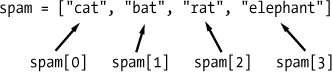
If you want to try some Python lists, please use this workspace:
To know more about lists, please visit this link
IO
It is always necessary to have a way to store the data when your program is running. In Python, there are several ways to persist data, so you can save important information for your applications. For this purpose, we have basic libraries and functions, such as open() and the library os.
In the following link you will find more information about how to handle files and persistency using Python.
Basic Exercises
Once you get familiar with Python language syntax, basic control and data structures, complete the following basic exercises to show what you’ve learnt:
Style guide
PEP 8
When you write Python code, it is always important to keep your code clean. For this reason, the community created a PEP (Python Enhancement Proposal). A PEP is a design document providing information to the Python community, or describing a new feature for Python or its processes or environment, where you can find the style guide when writing Python code. Find more information here.